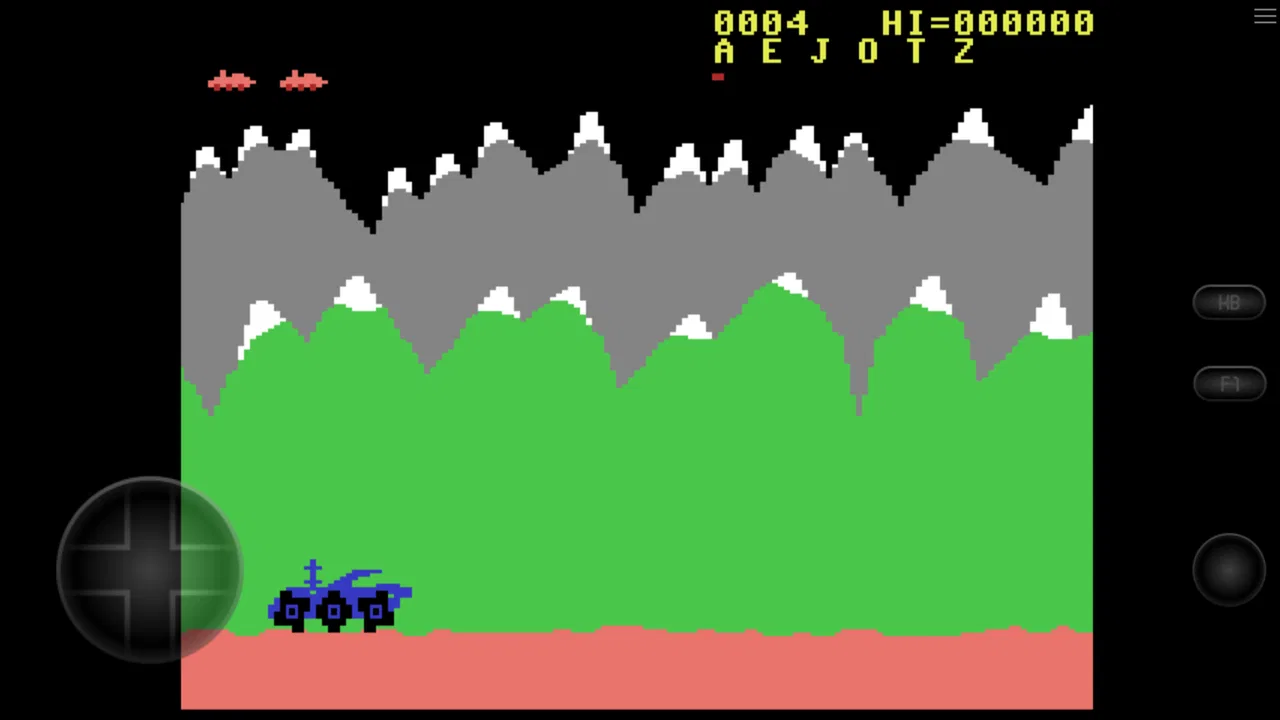
C64.emu (C64 Emulator)
- 3.2
- Rating
- 10.00K
- Installs
- $3.99
- Price

 Analysis by App-foxy
I approached C64.emu less like a modern arcade release and more like a compact doorway into Commodore 64 software. That distinction matters. This is an emulator game in the broad arcade category, developed by Robert Broglia, so its appeal comes from what it lets you run and revisit rather than from a new campaign, character roster, or reward track built specifically for the app.
My first impression was that the experience depends heavily on what you already want from a C64 emulator. If you are curious about older computer games, own legally obtained software for the system, or simply enjoy exploring classic home-computer design, it can be a practical mobile tool. If you expect instant missions, unlockable content, daily challenges, or a carefully paced arcade campaign, you may find the opening surprisingly bare.
The app costs $3.99 and is aimed at Everyone, which makes it accessible from an age-rating perspective. It has been available since Apr 1, 2013, and its current version is 1.5.85. Those details place it firmly in the long-running emulator category rather than the constantly changing live-service space. I would judge it by flexibility, responsiveness, and how well it supports a personal library, not by the standards of a contemporary free-to-play game.
You May Also Like

 Blood Strike: 2.5 Anniversary
Blood Strike’s Loadouts Turn Every Drop Into a Tactical Gamble
A close look at Blood Strike’s custom loadouts: how fast access to signature weapons reshapes its battle royale rhythm, rewards preparation, and narrows the gap between fights.

 Pandora - Music & Podcasts
Pandora’s Music Is Easy to Start, but Harder to Recover
Pandora’s strength is its low-effort path from a seed to a station. Its weak spot is how much confidence it asks you to place in connection, setup, and quiet recovery.

 8 Ball Pool
 Is Built on Rivalries, Rematches, and Routine
A close look at the rivalries, rematches, shared routines, and unanswered safety questions that turn a quick pool match into a persistent mobile community.

 Samsung Music
’s Quiet Strength Is Playing What You Already Own
Its reach comes less from spectacle than from dependable access to a personal library. That simplicity is both the app’s strongest retention engine and its ceiling.

 AccuWeather: Weather Radar
AccuWeather Review: A Quick, Clear Forecast for Everyday Decisions
For everyday plans, the best forecast is the one you can understand quickly. AccuWeather makes rain timing, radar, and local conditions easy to act on, with a few trade-offs.

 Hill Climb Racing
Why Hill Climb Racing Still Turns Crashes Into One More Run
A tiny car, a bumpy hill and one more upgrade: Hill Climb Racing keeps resurfacing because its simple chaos makes every near-miss feel personal.
More From Our News Desk
View All News


What you are really getting from the emulator
The basic promise is simple: C64.emu recreates a Commodore 64 environment on Android. The app itself is not a newly designed arcade game with a fixed set of levels. Instead, it provides the setting in which compatible Commodore 64 software can be used. That means the quality of your experience will vary according to the games you choose, the controls you prefer, and how much time you are willing to spend learning an older interface.
This is also why the first goal feels different from the goal in a normal arcade download. You are not immediately chasing a score or clearing a tutorial stage. Your early task is to get comfortable with the emulator: understand how its virtual controls feel, identify how you will load your software, and decide whether you want a quick touch-based session or a more deliberate setup with a physical controller.
I recommend treating the first session as preparation rather than judging the app after a few seconds. Older C64 programs often assume a different relationship between the player and the machine. Some begin with a title screen, some require a keyboard command, and some are designed around a joystick. The emulator can make those habits available on a phone, but it cannot remove every quirk of the original software.
A useful everyday scenario is a short commute or a quiet evening when you want to revisit one particular classic rather than browse a huge modern catalogue. I can see the app working well for someone who keeps a small, organized collection of legally obtained disk or tape images and wants that collection available away from a desk. The appeal is strongest when you already know what you want to run.
The first minutes reward preparation
One of the less obvious trade-offs is that convenience arrives after setup, not before it. A modern arcade game usually explains its controls and gives you a clear first objective. An emulator asks you to make more decisions. You may need to think about file organization, display orientation, input layout, and whether the original software expects keyboard input that is awkward on a touchscreen.
That is not necessarily a flaw. For enthusiasts, the extra control is part of the attraction. I would rather have an emulator that respects the structure of the original machine than one that hides everything behind a simplified launcher. But a newcomer should know that the first satisfying play session may require patience and a little experimentation.
My practical advice is to begin with one title that is already familiar to you. That gives you a reference point for sound, timing, controls, and loading behavior. If you start with an unknown program and encounter friction, you will not know whether the issue comes from the software, the virtual controls, or your expectations. A familiar game turns setup into a manageable comparison instead of a guessing exercise.
Another useful habit is to keep the number of test files small at first. A tidy folder with a few known items is easier to navigate than a large, unstructured archive. This is especially important on a phone, where scrolling through a long list can make an emulator feel less approachable than it really is.
Progress looks different from a normal arcade game
Because C64.emu is an emulator, it does not give you one universal progress bar. There is no single campaign that tells every user when they have advanced. Progress comes from the software you choose: reaching a new stage in one game, learning a difficult control pattern in another, or finally understanding an old program that seemed confusing at first.
That open-ended structure can be satisfying, but it also means the app does not manufacture motivation for you. A modern arcade title may use unlocks, missions, achievements, or escalating rewards to pull you into another round. Here, the reason to continue usually comes from the original game itself or from your personal interest in exploring C64 software.
This is the first major point where expectations matter. If you want a clearly measured journey, you may prefer a dedicated retro collection with a curated menu and built-in milestones. If you want to choose different kinds of software and move between them freely, an emulator offers more ownership and less hand-holding.
I found that the strongest progress signal is personal familiarity. After adjusting to a title’s timing and input demands, a game that initially feels stiff can become readable. That learning process is easy to overlook when comparing the app with newer releases, but it is central to the old-computer experience. The reward is not always a new item; sometimes it is finally understanding why a game was designed the way it was.
Challenge and pacing depend on the software
The difficulty curve is not controlled by one developer-made campaign. Robert Broglia provides the emulator layer, while the challenge comes from the C64 programs you load. Some may be immediately accessible, while others can be demanding because of their controls, limited instructions, unforgiving timing, or dated assumptions about how players learn.
This makes the app unusually flexible but also unpredictable. You can move from a relaxed exploratory experience to a demanding arcade challenge without changing applications, yet the transition may not be explained. I would not recommend judging the emulator by one particularly awkward title. Try more than one kind of software before deciding whether the platform suits you.
Touch controls are the biggest pacing variable for me. A virtual joystick can work well for slower movement or menu navigation, but fast arcade play may expose the difference between tapping glass and using a physical controller. When a game depends on precise diagonal movement, rapid button presses, or a firm joystick direction, the phone screen can become part of the challenge in a way the original player may not have experienced.
That leads to a concrete trade-off: portability versus control accuracy. Playing directly on a phone is convenient and keeps the whole experience compact. Using a compatible external controller, when available to your setup, can make action-oriented software feel more natural. The emulator is therefore best understood as a flexible platform whose comfort depends on how seriously you take a particular game.
Screen orientation can matter too. A display arrangement that feels fine for one title may make another feel cramped, especially when virtual controls occupy part of the screen. I suggest testing a game in short sessions and changing the layout before deciding that its pacing is poor. Sometimes the problem is not the game’s rhythm but the amount of usable screen space left for it.
Why the app can keep you coming back
The retention pressure here is self-directed. There is no need to return for a timed event or a rotating reward. You come back because an old game still has an unfinished challenge, because you want to compare several C64 experiences, or because the emulator makes a familiar piece of software easier to access than setting up original hardware.
That can be healthier than a reward loop designed to keep you checking in, but it is also less immediately compelling. After the novelty of loading an old title fades, the app needs a meaningful personal reason to stay installed. For me, that reason would be a focused library and a genuine interest in revisiting specific games. Without that, the emulator may become an occasional curiosity rather than a daily arcade destination.
A good workflow is to use it as a small rotating shelf instead of a giant archive. Keep a few games that represent different moods: one for short action sessions, one for slower experimentation, and one familiar favorite. This makes choosing something to play quick and preserves the sense of discovery without turning the app into a file-management project.
Another non-obvious benefit is that an emulator can change how you appreciate pacing. Older software often asks you to repeat a section until its rules become clear, rather than showering you with constant rewards. If you enjoy noticing patterns and improving through repetition, that restraint can feel refreshing. If you need frequent unlocks to maintain interest, the same restraint may feel like a lack of content.
Who should install it, and who should skip it
I would recommend C64.emu to a retro-computing fan, a player with a legally obtained C64 library, or someone who specifically wants an Android-based way to explore Commodore 64 software. It is also a reasonable choice for people who appreciate emulation as a hobby and do not mind learning a few machine-specific habits.
I would be more cautious about recommending it to someone who simply wants a polished arcade game to open and play immediately. The app does not replace the convenience of a curated modern collection. It also may frustrate players who dislike virtual controls, file organization, or older software that offers little explanation before asking for input.
Its age rating of Everyone makes the app broadly approachable, but that does not mean every included game will feel equally suitable for every player. The rating describes the app’s general audience, while the actual experience depends on the software being run. Parents or newcomers should still choose titles thoughtfully rather than assuming that every C64 program will have the same tone or complexity.
The public response is mixed, with an average rating of 3.2 from over 600 ratings and 88 written reviews. I read that as a sign that emulator expectations vary sharply. Enthusiasts may value access and flexibility, while casual users may penalize the learning curve or control friction. The app has passed 10K+ installs, which suggests a focused audience rather than the reach of a mainstream arcade hit.
How it compares with ordinary arcade alternatives
Compared with a conventional arcade game, C64.emu offers breadth through compatibility rather than breadth through a large built-in roster. A normal arcade release gives you a known control scheme, a defined difficulty curve, and a developer-selected sequence of goals. This emulator gives you a framework, then leaves much of the selection and pacing to you.
Compared with a curated retro collection, it is potentially more flexible but less immediately welcoming. A collection usually handles presentation for you and may include menus designed around quick discovery. C64.emu makes more sense when you care about the Commodore 64 specifically and want an environment that feels closer to using the original computer than browsing a themed compilation.
Compared with original hardware, the phone is easier to carry and simpler to fit into everyday life, but touch input and a small screen can change the feel. The best choice depends on your priority. If authenticity means physical controls and a real machine, hardware remains attractive. If authenticity means accessing the software’s behavior without maintaining old equipment, the emulator is the more practical compromise.
I would also avoid comparing it directly with contemporary mobile games that are built around constant progression. Those games are designed to explain themselves quickly and keep the player moving through rewards. This app’s value is quieter: it gives you access to a style of computing and game design that rewards curiosity, patience, and selective replay.
My verdict on its progression and staying power
The progression verdict is straightforward: C64.emu does not create a progression system for you, and that is both its strength and its main limitation. Goals, unlocks, challenge, and pacing come from the C64 software you choose and from your own reasons for returning. If you want a guided arcade journey, this will feel under-structured. If you want the freedom to explore a classic computer library on Android, that lack of a fixed path is exactly what makes it useful.
At $3.99, I see it as a focused purchase for people who already understand why they want a Commodore 64 emulator. I would not buy it expecting a self-contained game with a large amount of original content. I would buy it as a tool for revisiting legally obtained software, testing older design ideas, and keeping a personal retro setup close at hand.
My final recommendation is therefore conditional but positive. Give it a chance if you enjoy the process as much as the play: organizing a small library, adjusting controls, learning the habits of older games, and choosing your own challenges. Skip it if you want instant polish, a fixed reward path, or touch controls that never get in the way. For the right player, the freedom to define your own arcade journey is the real feature, and C64.emu delivers that more convincingly than a generic modern game could.
FAQs for C64.emu (C64 Emulator)
01What is C64.emu, and what does it emulate?
C64.emu is an emulator for the Commodore 64 home computer, allowing you to run compatible software on a modern Android device. It recreates the original system’s hardware and operating environment so you can play classic games, use old utilities, and explore C64 programs. You will need legally obtained compatible software files, such as disk or cartridge images, because the emulator itself does not provide copyrighted games or applications.
02Does C64.emu include Commodore 64 games or a system ROM?
C64.emu generally does not function as a ready-made library of commercial games. Users are expected to provide their own legally sourced game and program files, and some setups may also require compatible Commodore system ROM files depending on the emulator version and configuration. Before downloading, check the developer’s documentation for supported formats and ROM requirements, and only use files you own or are permitted to use.
03How easy is C64.emu to set up and use?
The basic setup is fairly straightforward for users who are familiar with emulators, but it may feel technical to beginners. You typically need to copy software files to your device, open them through the emulator, and configure controls, display options, sound, and storage locations. The on-screen keyboard and virtual joystick work well for many games, although some titles may require patience when entering commands or changing disk images.
04Can I use a physical controller with C64.emu?
C64.emu supports more than touch controls, making it a better choice for longer gaming sessions when paired with a compatible Bluetooth or USB controller. Controller behavior can vary depending on the device, Android version, and game, so you may need to map buttons manually. The virtual controls are useful when no gamepad is available, but a physical controller usually provides greater accuracy and a more authentic feel.
05What devices and features are supported by C64.emu?
C64.emu is designed for Android devices and its performance depends on your phone or tablet, operating-system version, and the complexity of the software being emulated. It typically offers adjustable video and audio settings, save-state functionality, customizable controls, and support for common C64 software formats. Features can differ between releases, so review the current store listing and permissions before installing, especially on newer Android versions.
Pros
- Accurate emulation of Commodore 64 games and software
- Supports physical keyboards and game controllers
- Save states make it easy to resume games quickly
- Works with many common C64 disk and tape image formats
- Offers useful video
- audio
- and control customization options
Cons
- Requires legally obtained game and software files
- The interface can feel dated and technical for beginners
- Some games need manual joystick or keyboard mapping
- Performance may vary on older or low-end devices
- Certain C64 programs may have compatibility issues

C64.emu (C64 Emulator)
Gallery